Broadcasting Basics
Until recently, broadcasting your services live over the internet for the average church was either too expensive or too technically challenging (and often both). With StreamingChurch.tv, we've provided an affordable solution that provides a professional experience for your guests and members that your volunteer staff can operate. A minimum amount of technical experience is required and we're here to help if you get stuck.
Camera(s)
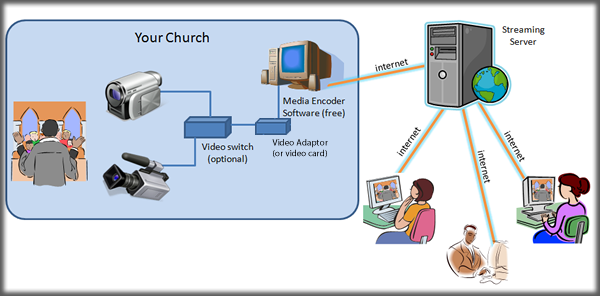
At your church, you'll need one or more cameras and a computer connected to the internet. For most churches, having cameras that operate well in low lighting are very important for a high quality video signal. If you elect to have more than one camera to film your service, you'll need to switch between camera feeds during the service. With the Microsoft Expressions encoder, a software video switch is provided. For other encoders (and multiple cameras), you may want to consider a video switch.
Computer
On the computer where you'll capture the video signal and transmit it to the StreamingChurch.tv streaming server, you'll need an adequate computer and video card or video capture device. We strongly recommend the use of Firewire. Recently purchased mid-range or above personal computers should be adequate to transmit your video signal. The Grass Valley ADVC55 is a recommended video capture device for streaming video. Your camera can plug into this video capture device using composite or S video. From there the device goes into your computer via Firewire. If your PC does not have a Firewire port you can purchase a Firewire Card for around $35.00. We highly recommend this configuration.
Encoding Software (free)
If you elect to stream your service using the Flash format (recommended), you'll need to download the Flash Media Live Encoder (download for free - Mac version / Windows version). We highly recommend Flash for your viewers over Windows Media player. If you elect to stream using the Windows format (not recommended), you'll need the Windows Expressions Encoder (download here for free). Another popular encoder is available from WireCast for both the PC and Mac.
You can stream to the iPhone, iPad, and iPod Touch with specific settings we will provide you. For more information contact us at [email protected].
Internet Connection
You should have a DSL or faster internet connection at your church to transmit the video signal to the StreamingChurch.tv Live streaming server. You can test your connection speed here. You should have at least 400 Kbps upload speed or greater.
 Streaming to iPhone/iPad/iPod Touch Included!